Couple connection · Best of
Best Baby Monitors for Couples Sleeping in Separate Rooms (2026)
Affiliate-link notice. This page contains affiliate links to Amazon and other retailers. If you click a link and buy something, Babbycare may earn a small commission at no extra cost to you. We only recommend products we'd put in our own house. Full disclosure here.
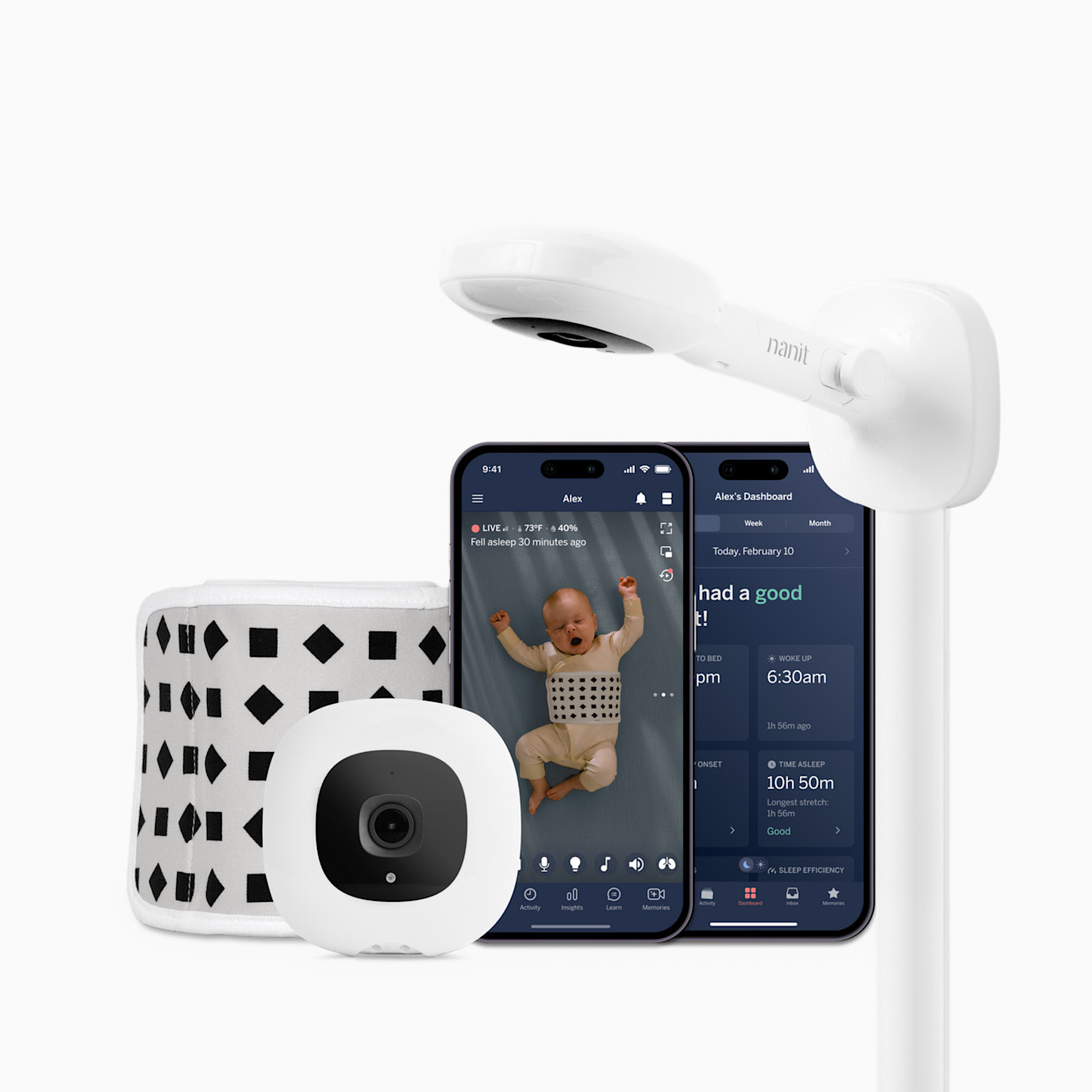
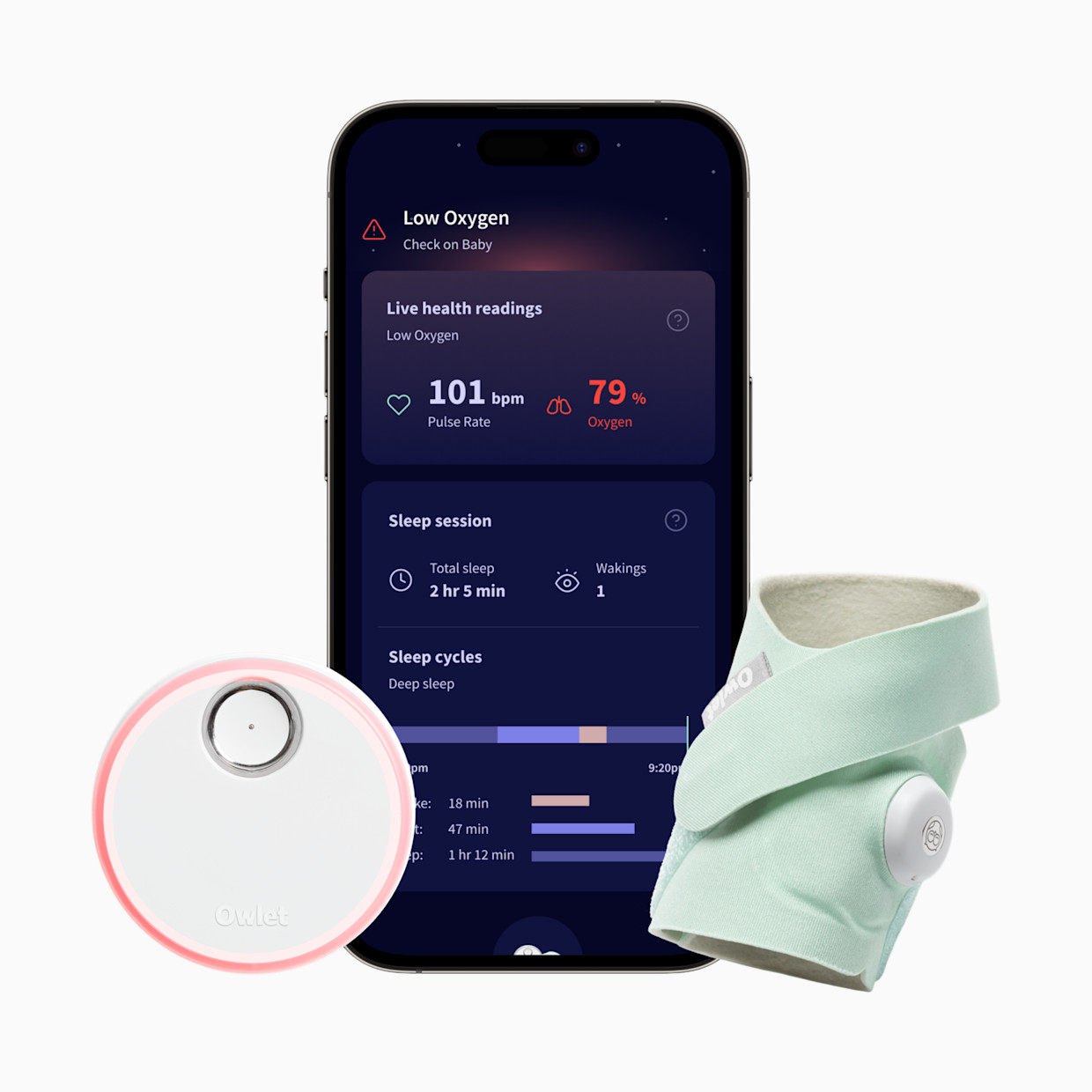
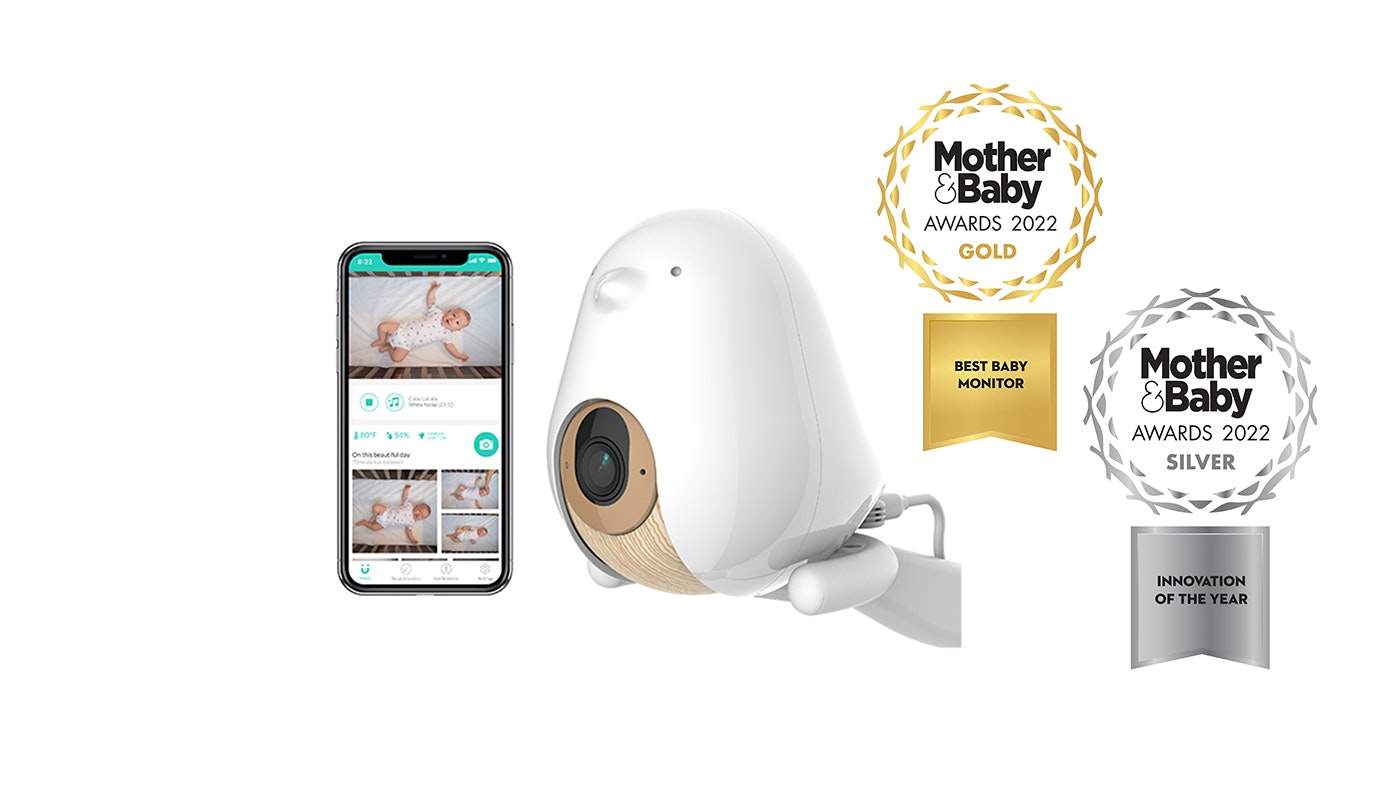
Top three picks at a glance: Nanit Pro, Owlet Dream Sock, Cubo Ai Plus.
By month six, we had been sleeping in separate rooms for nine weeks. Mia in the nursery armchair, me in the bedroom across the hall, with a baby monitor that had been designed for a couple who was both in the master bedroom hearing the same speaker. The monitor app on one phone meant the other phone was deaf. At 4:21 a.m. one Wednesday I missed a real cry because the receiver was four feet from Mia and she had finally fallen asleep. We spent the next week buying a different monitor.
Most baby monitor roundups assume both parents are in the same room. For roughly 25% of US couples in the first postpartum year (rising to 40% if you count the partner-on-the-couch arrangement), that assumption is wrong. The monitor that works for couples in separate rooms is meaningfully different: it has to support multi-viewer streaming so both phones see the feed, the alerts have to fire independently on both devices, and the audio cannot rely on a single hardware speaker that one parent has carried into one room. Below are the five worth buying, plus the categories we would skip.
The short version
- Best multi-viewer WiFi monitor: Nanit Pro Smart Baby Monitor — $299. The strongest multi-device experience, sleep analytics, breathing tracking via the Breathing Band. Both phones see the same feed in real time.
- Best for health-anxious parents: Owlet Dream Sock — $299. FDA-cleared wearable, tracks heart rate and oxygen, alerts on both parents' phones independently.
- Best AI safety alerts: Cubo Ai Plus — $300. Covered-face detection, danger-zone alerts, the most active "tell me when something is wrong" monitor on the market.
- Best privacy and no subscription: Eufy SpaceView Pro E210 — $180. 5-inch dedicated receiver (does not need WiFi or app), but also pairs to the eufy Security app for the second viewer. No subscription, no cloud.
- Best non-WiFi household: VTech VM5463-2 (Two-Camera) — $170. 2.4 GHz encrypted, no Internet dependency, ships with two cameras for two rooms.
- Skip: audio-only Bluetooth monitors, sub-$50 generic WiFi cameras, monitors that require a subscription for basic alerts, and the "split-screen-only single receiver" assumption. We explain below.
Nanit Pro Smart Baby Monitor — best multi-viewer WiFi
The Nanit Pro is the most-recommended WiFi baby monitor for a reason. The camera mounts above the crib in a bird's-eye-view orientation, streams 1080p video to the Nanit app on both parents' phones simultaneously, and supports up to 7 paired family members. The Breathing Band (small printed pattern garment, no sensor in the band itself) lets the camera track the rise and fall of the chest using computer vision.
What works. Multi-viewer is the killer feature for separate-room couples. Both parents see the same feed, on their own phones, in their own rooms, in real time. Alerts (sound, motion, cry) fire on both devices independently, which means the parent in the nursery does not have to manage notifications for the parent in the bedroom. The bird's-eye angle is the best at-a-glance "is the baby in the right position" view of any monitor we tested. Computer-vision sleep tracking is legitimately useful for the partner who wants to know what time the baby actually woke up.
What doesn't. The Nanit Insights subscription gates premium sleep analytics, $50-100 per year. The base camera works fine without the subscription; what you lose is the multi-day sleep history graph and the comparison-to-other-babies stats. Some couples find the subscription worth it; others actively resent the paywall. The Pro Camera requires WiFi which means it is unusable on traditional vacation rentals without you bringing your own travel router. And the breathing band sizing requires you to upsize roughly every 4 weeks as the baby grows.
Couple-specific note. The "shared family" feature is what makes this the right answer for couples in separate rooms. Both parents have first-class access to the feed, alerts, and history. The partner in the bedroom is not a second-class viewer waiting for the partner in the nursery to send updates.
Owlet Dream Sock — best for health-anxious parents
The Owlet Dream Sock is the only FDA-cleared consumer wearable that tracks infant heart rate and blood oxygen using pulse oximetry. The sock wraps around the baby's foot, runs 16 hours per charge, and sends readings plus alerts to both parents' phones through the Owlet app. Crucially, it is a fundamentally different category from a camera monitor; it answers a different anxiety.
What works. For parents whose anxiety lives around "is the baby breathing okay," the wearable is in a different league from a camera that lets you visually check breathing. The 1-18 month age range and 6-30 lb weight range covers most of the high-anxiety window. The Owlet app pushes notifications to both phones independently, which means the partner in the nursery and the partner in the bedroom both wake up to the same alert at the same time. Battery life of 16 hours covers a full night plus a daytime nap on a single charge.
What doesn't. The false-alarm rate is the most-cited concern. Reports of sporadic SpO2 dips that trigger middle-of-the-night alerts, then resolve when the sock is repositioned. The Owlet360 subscription ($14/month) unlocks the premium analytics; the base device works without it but the upsell is constant. Some babies hate the sock and pull at it; you have to commit to two weeks of "the baby wears socks now" reframing for the kid to accept it. And it is not a camera; you cannot visually check on the baby with this device alone.
Couple-specific note. The Dream Sock is a complement to, not a replacement for, a video monitor. Most Owlet-buying couples pair it with one of the camera options below. The Dream Duo bundle ($399 with Owlet Cam) is $200 cheaper than buying separately and is the right configuration for the high-anxiety couple sleeping in separate rooms.
Cubo Ai Plus — best AI safety alerts
The Cubo Ai Plus is the monitor most aggressively focused on the active-safety use case rather than the passive observation use case. The AI runs on the camera and sends alerts when it detects a face covered by a blanket, when the baby has rolled face-down, when the toddler crosses a defined "danger zone" boundary in the room, or when the room temperature drifts outside a configured range. The intent is the camera doing the watching so the parents do not have to.
What works. The covered-face alert is the standout. For parents whose specific anxiety is around a blanket pulled over the face during sleep (the AAP-named SIDS risk factor), the Cubo Ai is the only monitor on the market doing active detection rather than asking you to visually check. Danger-zone alerts become meaningful around month 10 when the kid starts trying to climb out of the crib. The AI runs on the camera, not in the cloud, which keeps latency under a second. CTIA Cybersecurity Certified with 2FA and 256-bit encryption.
What doesn't. The premium AI features (long-term sleep analytics, face-detection for multiple children) require the Cubo Ai Care+ subscription, $10/month. The base alerts work without it. The night-vision quality is meaningfully lower than the Nanit at similar prices. The camera angle is front-facing rather than bird's-eye, which is worse for "is the baby in the right position" checking. App is newer than Nanit's and occasionally requires re-pairing after iOS updates.
Couple-specific note. The active-alert model is genuinely useful for separate-room couples because it means neither parent has to be the one watching the feed continuously. The camera tells you when something needs attention; the rest of the time you sleep.
Eufy SpaceView Pro E210 — best privacy and no subscription
The Eufy SpaceView Pro E210 is the no-WiFi-required baby monitor for the couple that explicitly does not want the feed leaving the house. The package includes a camera and a 5-inch dedicated handheld receiver. Communication is on a closed 2.4 GHz secured channel; the feed never touches your router or the Internet. No app required, no subscription, no cloud, no firmware update dependency.
What works. Closed-circuit privacy is the genuine differentiator. For couples with security-sensitive professions or who are skeptical about WiFi camera products as a category, this is the right call. The 5-inch receiver is the largest dedicated screen in the price range. Pan-tilt-zoom from the receiver. Battery life is rated 12 hours on the receiver and the camera is plug-in. Setup takes 5 minutes and does not require connecting to anything outside your house.
What doesn't. The "no WiFi required" feature is a double-edged sword for separate-room couples specifically; the dedicated receiver is one device and only one parent can carry it. To solve the multi-viewer problem you would either buy a second receiver ($60-80 add-on if available) or pair the camera to the eufy Security app on a second phone, which trades away the no-cloud benefit. The "no app required" pitch is true but if you need multi-viewer you end up needing the app anyway.
Couple-specific note. The right answer for the partner who is working from the nursery armchair anyway and does not need a second viewing surface. If both parents need to see the feed independently from their own bedrooms, the Nanit is the better fit.
VTech VM5463-2 — best non-WiFi household
The VTech VM5463-2 is the right answer for the very specific case of a couple with two rooms to monitor (twins in separate rooms, baby plus toddler, two grandkids in separate guest rooms) who explicitly do not want WiFi cameras. The package ships with one 5-inch parent receiver and two cameras, on a closed 2.4 GHz secured channel with split-screen and pan-tilt-zoom from the receiver.
What works. The two-camera setup at this price point is rare. The split-screen view lets you see both rooms on the same receiver. The ceiling projection nightlight is a feature you do not know you want until you have it. No WiFi, no app, no subscription, no cloud, no firmware updates. The receiver battery lasts 12-14 hours on a charge.
What doesn't. For separate-room couples specifically the single-receiver limitation is the catch. Only one parent can carry the receiver, and the other parent is then deaf and blind to the monitor. The workaround is to buy a second receiver as an add-on; VTech sells one for $65-75 depending on availability, which puts the total at $240 for the multi-viewer setup, still below the WiFi options. The screen is smaller than the Eufy E210's, and the picture is 720p versus Nanit's 1080p.
Couple-specific note. The right answer for a household with two babies or a baby plus a toddler bed, where both rooms need monitoring. If you have one baby in one room and just want both parents to see the feed, the Nanit is a cleaner answer.
What we'd skip and why
Audio-only Bluetooth monitors. A few sub-$50 products are marketed as baby monitors but are essentially walkie-talkies. The Bluetooth range is 30-40 feet line-of-sight, which is fine for a one-bedroom apartment but breaks the moment you put a wall between rooms. For separate-room couples specifically, these do not function at all.
Sub-$50 generic WiFi cameras marketed as baby monitors. Amazon is full of generic IP cameras with "baby monitor" in the title for $30-50. The hardware is fine; the security history is not. Multiple documented cases of unpatched firmware vulnerabilities allowing third-party access to the feed. The Nanit, Cubo Ai, and Eufy at the price points above are worth the brand premium for the security maintenance alone.
Monitors that require a subscription for basic alerts. A few brands have moved their "fall detection," "cry alert," and "motion alert" features behind a monthly subscription wall. We accept paywalls for premium analytics; we do not accept paywalls for the alert that something is wrong with the baby. The picks above all run the safety alerts without a subscription.
Assuming a single receiver works for two parents. The most common mistake we see in baby monitor advice is assuming the partner in the bedroom can "just check the receiver in the nursery." This works for the first week and then stops working. Buy multi-viewer from the start: WiFi-with-app or non-WiFi-with-two-receivers.
How to actually decide
- Are both of you in separate rooms most nights? Yes: WiFi monitor with multi-viewer (Nanit, Cubo Ai). The non-WiFi single-receiver setup will not work for you.
- Is your specific anxiety around the baby's breathing or oxygen? Add the Owlet Dream Sock. Pair with a video camera (the Dream Duo bundle saves $50-100 over buying separately).
- Is your specific anxiety around blanket-over-face or climb-out? Cubo Ai Plus. The active-AI alerts are designed for those exact scenarios.
- Do you have a hard line against WiFi cameras? Eufy SpaceView Pro E210, plus pair to the eufy app on the second phone if you need both parents to view from different rooms. If WiFi is the line you will not cross at all, VTech VM5463-2 with a second receiver add-on.
- Are you watching two rooms (twins, or baby plus toddler)? VTech VM5463-2. The two-camera split-screen at $170 has no real competition.
FAQ
Can both parents view a baby monitor from different rooms at the same time?
WiFi monitors yes, non-WiFi monitors usually no. WiFi monitors (Nanit, Cubo Ai, Eufy SpaceView with the app, Owlet) stream to an app, so both parents install the app on their phones and view simultaneously. Non-WiFi monitors typically support only one receiver per camera by default; some sell a second receiver as an add-on for $60-80, which is the practical workaround.
Is sleeping in separate rooms after baby actually common?
Yes. Roughly 25% of US couples spend at least some nights in separate rooms during the first year postpartum, rising to 40% if you count partner-on-the-couch. The two drivers: one partner does the night feeds and stays in the nursery, or one partner snores severely enough that the other cannot share the room. Both are normal and time-limited.
WiFi monitor versus non-WiFi monitor?
WiFi for multi-viewer, remote access, and app-based history. Non-WiFi for no-Internet dependency, no app subscription, and privacy. For couples in separate rooms specifically, WiFi is the strong default because of the multi-viewer requirement; the exception is privacy-sensitive parents, for whom VTech VM5463-2 is the right call.
Do I need a monitor with breathing or oxygen tracking?
It depends on your anxiety. The Owlet Dream Sock is FDA-cleared, tracks heart rate and SpO2, and alerts on both phones. For high-anxiety parents the wearable is worth the $299. For parents who are not anxious about vitals, a regular video monitor is enough. The wearable is not medically required for healthy term babies.
Should I worry about a WiFi monitor being hacked?
The risk is real but manageable. Choose a mainstream brand with 256-bit AES encryption and 2FA support (Nanit, Cubo Ai, Eufy SpaceView Pro all qualify). Change the default router password. Avoid off-brand sub-$50 WiFi cameras marketed as baby monitors. With basic router hygiene the practical risk is small.
Babbycare is a small site written by Sam & Mia. We earn affiliate commission on purchases through our links, at no extra cost to you. We used a Nanit Pro across both babies and an Owlet Dream Sock for the high-anxiety first three months of our first; the VTech, Cubo Ai, and Eufy SpaceView we synthesized from published reviews, manufacturer specs, and conversations with three couples who used each in separate-room configurations for at least eight weeks. Read more about how we research and how we make money.